

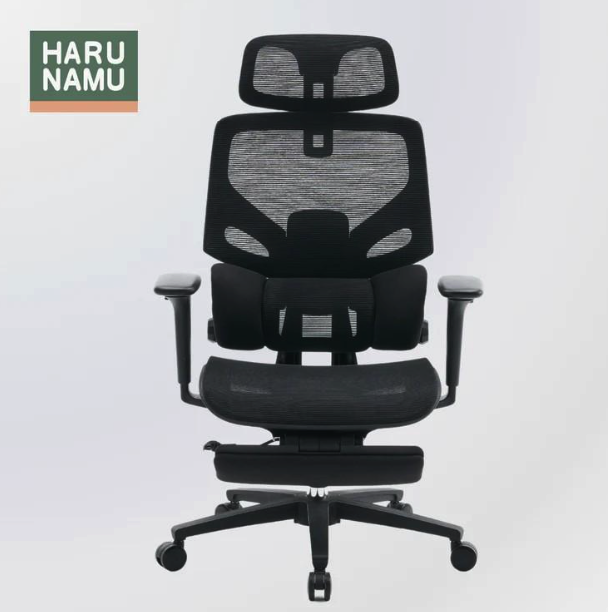
There is a specific, quiet frustration that comes with upgrading your home office. You do the research. You read the reviews. You finally bite the bullet and invest in a high-quality, fully adjustable ergonomic chair. You assemble it, slide it up to your desk, and sit down, expecting the clouds to part and your back pain to vanish instantly.
For the first hour, it feels great. But by day three, that familiar ache in your shoulders returns. By week two, you’re fidgeting again. You start to wonder: Did I buy the wrong chair? Was it all a marketing gimmick? Is my back just broken?
As industry curators who have spent years vetting furniture and analyzing workstation dynamics, we hear this story constantly. The customer isn’t wrong about the pain, but they are almost always wrong about the culprit.
Here is the hard truth: An ergonomic chair is not a magic pill.
It is a foundational tool, yes. It is arguably the most important piece of the puzzle. But it is still just one piece. Ergonomics is not about a single product; it is about a system—the geometric relationship between your body, your chair, your executive desk, your screen, and your environment If any one of those variables is out of alignment, even the most expensive chair in the world cannot save you. If you have the chair but still feel “off,” you are likely suffering from one of the invisible ergonomic disconnects listed below. Here is how to diagnose and fix them.
1. The “Floating Arm” Syndrome (Your Desk Is Too High)
This is the single most common saboteur of a good chair.
In the furniture industry, there is a standard height for office desks: typically 29 to 30 inches (approx. 74-76cm). This standard was established decades ago, ostensibly to accommodate a 6-foot-2 male wearing shoes.
The problem? Most people are not 6-foot-2.
If you are 5’8″ (173cm) or shorter, a standard desk is almost certainly too high for you. When you sit in your new chair, you probably adjust the seat height so your feet are flat on the floor (as you should). But when you pull up to the desk, you find the surface is at chest level rather than elbow level.
The Ripple Effect: To compensate for the high desk, you have two bad choices:
- The Shrug: You keep your chair low but shrug your shoulders up toward your ears to get your hands onto the keyboard. This causes chronic tension in the trapezius muscles (the “knots” in your shoulders) and neck pain.
- The Perch: You raise your chair height so your arms are comfortable, but now your feet dangle off the floor. This cuts off circulation under your thighs and destabilizes your pelvis, causing you to slouch.
The Fix: Your elbows should be at a 90-degree angle, resting lightly on your armrests or desk surface, with your shoulders completely relaxed.
- If your desk is adjustable: Lower it until your keyboard meets your hands at resting elbow height.
- If your desk is fixed: Raise your chair until your arms are in the perfect position. Then—and this is crucial—use a footrest to bring the “floor” up to your feet. This re-engages your kinetic chain and lets your chair do its job.
2. The “Turtle Neck” Dynamic (Your Monitor Is Wrong)
You bought a chair with a headrest. You bought a chair with a reclining backrest designed to offload the weight of your torso. But you never actually use the backrest because you are constantly leaning forward, craning your neck toward your screen like a turtle.
This is called “forward head posture.” For every inch your head moves forward from its neutral alignment, the effective weight of your head on your neck doubles.
The Hidden Issue: Often, the issue isn’t discipline; it’s vision. If your monitor is too far away, too small, or set to a resolution that makes the text tiny, your body will instinctively lean in to bridge the gap. You are literally pulling yourself out of the protective embrace of your chair to see your work.
Another common issue, particularly for those using a gaming-style pc chair, is the conflict between the chair’s “racing bucket” wings and the desk. If the chair is too wide or the armrests interfere with the desk edge, you can’t scoot in close enough. This forces you to lean forward to reach your mouse and keyboard, negating the benefits of the backrest.
The Fix:
- ** The High-Five Test:** Sit back in your chair. Extend your arm. You should be able to just touch your screen with your fingertips. If you can’t reach it, it’s too far.
- Eye Level: The top third of your monitor screen should be at eye level. If you are looking down, you are straining your neck.
- Zoom In: Don’t be a hero. Increase the scaling on your OS to 125% or 150% so you can sit back and read clearly without squinting or leaning.
3. The Micro-Climate Crisis (You Are Overheating)
Comfort is not just structural; it is thermal.
We often underestimate the physiological stress of heat. If you are working in a humid environment (common in places like Singapore) or a room with poor airflow, your choice of upholstery matters immensely.
You might have bought a plush, leather-bound executive chair because it looked luxurious. But after 45 minutes, heat begins to build up between your back and the cushion. Your body temperature rises. Subconsciously, you become restless. You shift. You lean forward to let your back “breathe.” You fidget.
Every time you fidget due to heat, you break your ergonomic posture. You abandon the lumbar support simply to cool down.
The Fix: This is where material selection becomes a productivity factor. High-quality mesh office chairs are often superior for long-duration work in modern, climate-controlled (or non-climate-controlled) homes.
The suspension mesh allows for continuous airflow, dissipating body heat and keeping your skin temperature regulated. This prevents the “sweat-shift” cycle, allowing you to remain seated in the correct, supported position for longer periods without low-level physical distress distracting you from your work.
4. The “Laptop Hunch” (The Destroyer of Ergonomics)
If you are working directly off a laptop placed on your desk, you do not have an ergonomic setup. Period.
It is physically impossible to maintain good posture while working on a laptop. If you place it so the screen is high enough for your eyes, the keyboard is too high for your hands (causing shoulder pain). If you place it so the keyboard is comfortable for your hands, the screen is too low (causing neck pain).
No chair can fix this geometry. You could be sitting in a $2,000 desk chair engineered by NASA, but if your focal point is down at your navel, you will slouch. The laptop forces your chest to collapse and your spine to round, rendering your lumbar support useless because your lower back isn’t even touching it.
The Fix: You must separate the screen from the keyboard.
- Get a Laptop Stand: Raise the laptop screen to eye level.
- Use Peripherals: Invest in an external keyboard and mouse. This allows you to sit back into your chair, open your chest, and look straight ahead, finally allowing the chair’s engineering to support your spine as intended.
5. The Lighting Disconnect (The Glare Factor)
Ergonomics is also about the eyes. Your body will contort itself to avoid visual discomfort.
If you have a window behind you, it reflects off your screen (glare). If you have a window in front of you, the contrast between the bright outdoors and your screen causes eye strain.
To avoid glare, people often twist their bodies, sit at odd angles, or hunch over to shadow the screen with their own torso. This twisting leads to asymmetrical muscle strain, often manifesting as pain on just one side of the lower back or hip. You might blame the chair’s cushion for being uneven, but the reality is that you are sitting unevenly to protect your eyes.
The Fix:
- Perpendicular Positioning: Ideally, your desk should be perpendicular to the window (light comes from the side).
- Bias Lighting: Put a soft light behind your monitor. This reduces the contrast between the bright screen and the dark wall behind it, reducing eye strain and the subconscious urge to lean in.
6. The Psychological Association (The “Work-Life” Blur)
Sometimes, the “off” feeling isn’t physical—it’s psychological. In a home office, the lines blur. If you are working in your bedroom, or at the dining table, your brain struggles to enter “deep work” mode.
A chair is more than a seat; it is a cockpit. If your chair feels flimsy, creaky, or temporary, you feel temporary. We have seen many customers upgrade from a generic, rattle-prone seat to a solid, silent, high-performance chair and report an immediate shift in mindset.
The Fix: Treat your workstation as a professional cockpit. Ensure your chair is solid and silent. Tighten the bolts. Lubricate the casters if they drag. If your current setup feels like a “make-do” situation, your body will remain in a state of low-level fight-or-flight tension. A solid, reliable chair anchors you, signaling to your brain that it is safe to settle in and focus.
The Ecosystem of Comfort
If your workspace feels “off,” don’t immediately blame the purchase you just made. Take a step back and look at the ecosystem.
Is your desk forcing a shrug? Is your laptop forcing a hunch? Is your monitor forcing a lean? Is the material making you sweat?
The goal of ergonomics is neutrality—a state where your body is neither fighting gravity nor fighting your furniture. A great chair is the throne from which you work, but you must ensure the kingdom around it is built to serve you, not fight you.
Audit your setup today. Lower the desk (or raise the feet). Lift the screen. Clear the glare. Once you align the environment, you will finally feel what that chair was designed to do.
Frequently Asked Questions
Q1: My lower back still hurts even with lumbar support. Why? You might be sitting too far forward. For lumbar support to work, your hips must be all the way to the back of the seat pan. If you sit on the edge of your seat (“perching”), the lumbar support isn’t touching you. Alternatively, the support might be too high or low. Adjust it so it nests perfectly in the curve of your lower spine, right around the beltline.
Q2: Is a headrest necessary for a productivity setup? It depends on your work style. If you sit upright and type constantly (active tasking), you may not use it much. However, if you recline to read, think, or take calls, a headrest is essential to offload the weight of your head and prevent neck strain.
Q3: Why do my legs go numb in my new chair? This is usually an issue of seat depth. If the seat pan is too long, it presses against the back of your knees (the popliteal fossa), cutting off circulation. You should be able to fit a clenched fist (or 3-4 fingers) between the edge of the seat and your calf. If you can’t, check if your chair has a “seat slide” adjustment to shorten the depth.
Q4: How often should I replace my chair? A high-quality ergonomic chair should last 7-10 years. However, cheaper foam cushions can compress and lose their supportive properties within 1-2 years. If you feel like you are “bottoming out” or sitting on a hard surface, the foam has failed, and it’s time to upgrade to a more durable option like high-density cold-cure foam or high-tension mesh.
Q5: Should I use armrests while typing? The consensus among modern ergonomists is that your armrests should support your elbows during rest breaks or micro-pauses, but you shouldn’t necessarily plant your elbows on them while vigorously typing if it locks your wrists. The armrests should be at desk height so your arms can float effortlessly between the armrest and the keyboard without shrugging or dropping.
By: Chris Bates